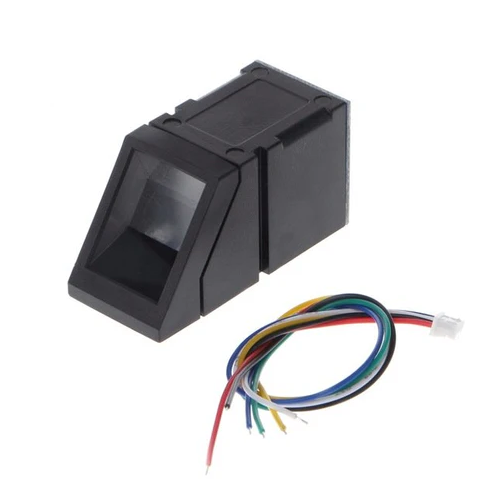
Key Features:
High-Quality Sensor: The R307 module uses a high-quality optical fingerprint sensor to capture and process fingerprint images accurately and reliably.
Integrated Processing: The module typically comes with an integrated fingerprint processing algorithm, enabling it to perform fingerprint matching and verification onboard.
UART Interface: The R307 fingerprint module often supports communication through a UART (Universal Asynchronous Receiver/Transmitter) interface, making it easy to interface with microcontrollers or other embedded systems.
Easy Integration: The compact size and straightforward interface make it relatively easy for developers to integrate the R307 fingerprint sensor into their projects.
Fast Recognition Speed: The fingerprint sensor is designed for quick and efficient fingerprint recognition, providing fast response times for authentication.
Secure Enrollment and Matching: The module's algorithm ensures secure enrollment and matching processes, minimizing the chances of false positives or unauthorized access.
Wide Operating Voltage Range: The module can operate within a wide voltage range, making it compatible with various power supply configurations.
Pinouts:
Red wire (5v)
Black wire (GND)
Yellow (TXD)
White (RXD)
Green (Touch)
Blue (3.3v)
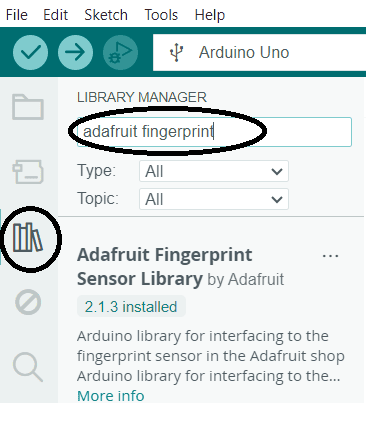
Note: Libraries to Install : "Adafruit Fingerprint Sensor Library"
![]()
R307 Fingerprint Sensor - Pin Details
The R307 fingerprint sensor has four important pins, which need to be connected to the Arduino Uno as follows:
| R307 Pin | Wire Color | Arduino Pin | Function |
|---|
| Pin 1 | 🔴 Red | 5V | Power Supply (+5V) |
| Pin 2 | ⚫ Black | GND | Ground (-) |
| Pin 3 | 🟡 Yellow | D2 | Serial TX (Data Transmission) |
| Pin 4 | 🟢 Green | D3 | Serial RX (Data Reception) |
💡 Note: Since the Arduino Uno has only one hardware serial port, use Software-Serial to communicate with the fingerprint sensor through D2 and D3.
Testing & Output
After making the connections, follow these steps to test your R307 Fingerprint Sensor with Arduino Uno using the Adafruit Fingerprint Sensor Library.
1. Install the Adafruit Fingerprint Sensor Library
👉 Open Arduino IDE
👉 Go to Sketch > Include Library > Manage Libraries
👉 Search for "Adafruit Fingerprint Sensor Library" and install it.
2. Load the Fingerprint Enrollment Code
👉 Go to File > Examples
👉 Scroll down and find Adafruit Fingerprint Sensor Library
👉 Select "enroll"
3. Upload the Code to Arduino
✅ Connect your Arduino Uno to your PC via USB
✅ Select the correct Board (Arduino Uno) and Port in Arduino IDE
✅ Click the Upload button
4. Open the Serial Monitor
🔹 Go to Tools > Serial Monitor
🔹 Set the Baud Rate to 9600
🔹 Follow the on-screen instructions to enroll a fingerprint
🔹 Once successfully enrolled, try scanning the same finger to verify
Expected Output in Serial Monitor
"Adafruit Fingerprint sensor enrollment
Type in the ID # (from 1 to 127) you want to save this finger as..."
![]()